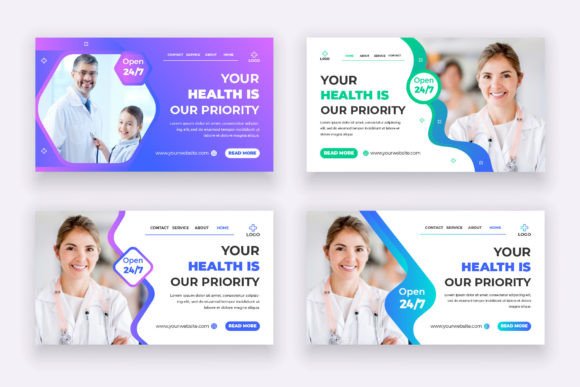
Medical Healthcare Landing Page Design: A Professional Template
When launching a new medical practice, telehealth service, or wellness product, the digital front door is often the deciding factor for potential patients. A generic, clunky website can immediately erode trust in an industry where credibility is paramount. This is where a specialized Medical Healthcare Landing Page Design becomes an indispensable asset. It serves as a pre-constructed blueprint, meticulously crafted to align with the visual language of the healthcare sector—clean lines, calming colors, and intuitive navigation—allowing professionals to establish a polished online presence without the overhead of hiring a full design agency from scratch.
Beyond Basic Templates: The Anatomy of Trust
Healthcare is unique because the "customer" is often anxious or seeking urgent help. Therefore, the design cannot simply be "pretty"; it must be functional and reassuring. This specific template is built on a foundation of Adobe Illustrator (AI & EPS files), ensuring that the graphics remain vector-based and infinitely scalable, which is crucial for maintaining clarity across high-resolution retina displays and large-format printing.
The visual appeal of this design lies in its adherence to modern typography and a structured layout. It avoids the clutter often found in general business templates. Instead, it prioritizes whitespace and readability, which are critical for web design in the medical field. The use of RGB color mode and a 1920x1080 pixel dimension ensures that the design looks vibrant and fits standard desktop viewports perfectly, providing a seamless user experience from the moment the page loads.
Practical Applications: From Branding to Print Materials
While the file is marketed as a landing page, its utility extends far beyond a single webpage. For a small business owner or entrepreneur, versatility is key to maximizing a design investment. Because the source files are fully editable in Illustrator, you can deconstruct the elements to create a cohesive brand identity.
Consider the following practical uses for this design asset:
- Logo Design & Branding: Extract specific icons or typography arrangements to create a standalone logo or sub-mark for a specific department within a clinic.
- Social Media Graphics: Adapt the layout sections to fit Instagram stories or Facebook covers, ensuring your digital marketing matches your website's look and feel.
- Print Materials: Adjust the color mode to CMYK for printing brochures, appointment cards, or packaging design for pharmaceutical products.
- Editorial Layouts: Use the grid structure to design patient intake forms or quarterly wellness newsletters.
- Digital Products: If you are a health coach, you can repurpose the design to create downloadable PDF guides or e-book covers.
Mastering the Typography and Readability
One of the standout features of this package is its focus on readability. In medical communication, ambiguity can be dangerous. The template utilizes fonts that are legible at various sizes, ensuring that critical information—like contact details or service lists—is easily digestible.
When customizing this template, pay close attention to your font pairing. The included files likely come with a help guide detailing the specific typefaces used. If you choose to swap them out, adhere to these principles:
- Hierarchy is King: Use a bold display font or sans serif font for headers to grab attention, but switch to a clean, neutral typeface for body text to reduce eye strain.
- Spacing Matters: Healthcare designs benefit from generous line height (leading). Tight text blocks can feel claustrophobic and stressful.
- Avoid Overly Decorative Fonts: While a script font or handwritten font might work for a boutique yoga studio, they are generally inappropriate for clinical settings where authority and clarity are required.
Streamlining Your Workflow with Editable Assets
Time is a commodity that healthcare professionals rarely have in excess. The primary value of this Medical Healthcare Landing Page Design is the efficiency it offers. You don't need to be a coding wizard or a senior graphic designer to make it work for you. If you know the "very basics of Illustrator," you can update the text, swap out stock photography for real photos of your facility, and adjust the color palette to match your existing branding.
This ease of customization transforms the asset from a static image into a dynamic marketing asset. Whether you are a content creator developing a campaign for a hospital client or a practitioner setting up a side hustle, the ability to quickly iterate on designs allows you to test different visual communication strategies. You can A/B test different headlines or calls-to-action by simply editing the text layer and exporting a new version, helping you optimize for audience engagement without waiting for developer queues.
Ensuring Professional Presentation and Licensing
Before finalizing your design, it is vital to consider the legalities of your assets. The template specifies that fonts used are free, but as a marketer or business owner, you must always double-check the licensing. Even free fonts can have restrictions on commercial use, particularly if you are embedding them in a digital product for resale.
Furthermore, a professional presentation requires attention to detail. Ensure that your final output is optimized for the web. While the source file is at 72 DPI (standard for screens), if you plan to use elements for poster design or packaging, you will need to ensure your raster images (photos) are high resolution. The vector nature of the AI file means the shapes and text will remain sharp, but your background imagery needs to be equally crisp to maintain that high-end look.
By leveraging a dedicated healthcare design template, you bridge the gap between clinical expertise and visual appeal. It allows you to communicate professionalism, empathy, and reliability the moment a user lands on your page, ultimately fostering the trust required to convert a visitor into a patient.