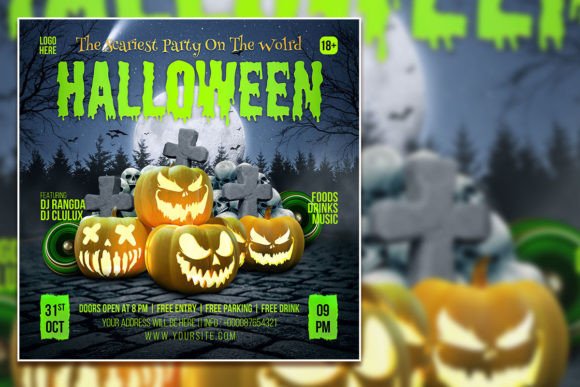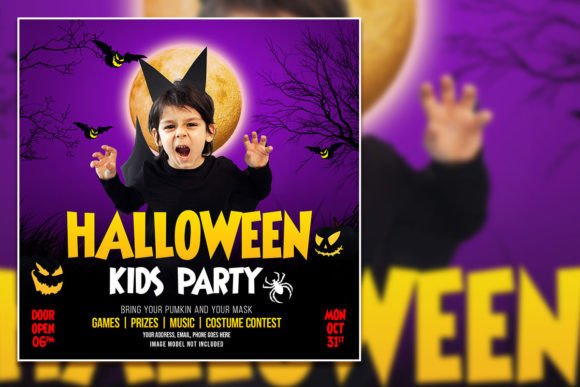
Spooky-Fun Halloween Kids Party Social Media Post Template
Every October, the race begins to create the perfect Halloween party invitation that parents will actually notice and kids will get excited about. Whether you're a small business owner hosting a community event, a parent organizing a neighborhood bash, or a content creator looking to boost engagement during the spooky season, having a polished, eye-catching design ready to go saves you hours of stress. That's where a well-crafted Halloween Kids Party Social Media Post template becomes your secret weapon—giving you a professional foundation that you can customize in minutes rather than starting from scratch.
Why This Template Works for Busy Creators and Business Owners
Let's be honest: not everyone has the budget to hire a graphic designer for every seasonal promotion. And even if you do, turnaround times can be tight when Halloween is just around the corner. This fully editable Halloween flyer template gives you the best of both worlds—professional-quality design with complete creative control. The PSD file comes organized with clean layers, meaning you won't waste time hunting through a confusing mess of elements just to change a font or swap out a background color.
The template measures 2000 x 2000 pixels at 300 dpi in RGB color mode, which means it's versatile enough for both digital use and high-quality print. You can post it directly to Instagram, Facebook, or Pinterest without worrying about pixelation, and you can also print it as a physical flyer for bulletin boards, storefront windows, or handouts at school events. That kind of flexibility matters when you're trying to maximize every design asset in your marketing toolkit.
Practical Applications Beyond Just a Party Invite
While the name suggests a Halloween Kids Party Social Media Post, the real value of a template like this extends far beyond a single event. Think about the broader seasonal marketing opportunities that roll around every fall. Bakeries promoting pumpkin-flavored treats, boutique shops running costume sales, community centers advertising trunk-or-treat events, or even bloggers creating themed content for October—all of these scenarios benefit from a cohesive, festive visual.
Here's where the template really shines for different users:
- Small business owners can use it to promote seasonal sales, Halloween-themed products, or in-store events without spending a dime on outsourcing.
- Content creators and bloggers can adapt it for Instagram stories, Pinterest pins, or Facebook event covers that drive traffic to their sites.
- Parents and community organizers can create polished invitations that look like they came from a professional print shop.
- Marketers and entrepreneurs can repurpose the design across multiple platforms—email headers, website banners, and even printed posters—to maintain visual consistency throughout a campaign.
The key is that all text can be edited, and you can replace the placeholder photo with your own image for a more personalized, authentic look. That single swap—using a real photo from last year's party or a snapshot of your storefront decked out in cobwebs—immediately makes the design feel more trustworthy and relatable to your audience.
Editing Made Simple: No Design Degree Required
If you've ever opened a Photoshop file and felt immediately overwhelmed, you'll appreciate how straightforward this template is. The layers are organized logically, so finding the text you want to change, the background you want to adjust, or the graphic elements you want to reposition takes just a few clicks. Want to swap the font? Select the text layer with the text tool and type your own message. Need to change the color scheme to match your brand palette? The RGB color mode makes it easy to experiment until everything feels right.
This is particularly helpful for small business owners who wear a dozen hats and don't have time to learn complex design software from scratch. The learning curve here is gentle—you just need a basic working knowledge of Adobe Photoshop. Open the file, edit what you need, export it in your preferred format, and you're ready to publish.
Building Brand Recognition Through Seasonal Design
One thing that separates forgettable marketing from memorable branding is consistency. When your Halloween promotions share a visual style with your other seasonal content—same color families, similar typography choices, a recognizable layout structure—your audience starts to associate that aesthetic with your brand. Over time, they'll recognize your posts before they even read the text.
A Halloween Kids Party Social Media Post template serves as a building block in that larger brand identity system. By customizing it with your logo, your brand colors, and your signature tone of voice, you transform a generic spooky design into something that feels distinctly yours. Parents planning their kids' Halloween activities will remember the business or organizer whose flyers stood out—not because they were the flashiest, but because they looked consistently professional and trustworthy.
This principle applies whether you're running a local dance studio, managing a daycare center, selling handmade costumes on Etsy, or organizing a church fall festival. The template is a starting point; your brand personality is what makes it resonate.
Tips for Getting the Most Out of Your Editable PSD Template
Before you dive into editing, take a moment to plan your approach. A little preparation goes a long way toward creating a final product that actually serves your goals.
- Gather your brand assets first. Have your logo file, brand colors (in hex codes if possible), and preferred fonts ready before you open the PSD. This prevents the common trap of endlessly tweaking without a clear direction.
- Choose your hero image carefully. Since you can replace the photo, pick something that captures the energy you want to communicate. A bright, candid shot of kids in costumes works beautifully for a party invite, while a more stylized image of Halloween décor might suit a retail promotion.
- Keep your message focused. Resist the urge to cram every detail onto the flyer. Include the essentials—what, when, where, and how to RSVP or buy tickets—and let the design do the heavy lifting on atmosphere and excitement.
- Test readability at different sizes. Remember that this template will likely be viewed on small phone screens as well as larger desktop monitors. Make sure your text is legible when the image is scaled down to a social media thumbnail.
- Export in the right format for each platform. A high-resolution PNG works for most social media platforms, but you might want a PDF version for print. Since the file is set at 300 dpi, print quality will be sharp and professional.
These small steps ensure that your final design doesn't just look good in Photoshop—it performs well in the real world where your audience will actually see it.
The Bigger Picture: Smart Design Saves Time and Builds Trust
Seasonal marketing has a short window. By the time most people start thinking about Halloween, the best promotional opportunities are already competitive. Having a reliable, editable template in your design toolkit means you can move quickly without sacrificing quality. You're not scrambling to throw something together at the last minute—you're refining a professional foundation that already looks polished.
For creative entrepreneurs, this kind of efficiency is everything. The time you save on design can go toward planning the actual event, engaging with your audience on social media, or developing other aspects of your business. And because the template is built at a high resolution with organized layers, the end result communicates the same level of professionalism as a custom-designed piece.
Whether you're promoting a kids' costume contest, a haunted house fundraiser, a fall harvest celebration, or a simple neighborhood gathering, starting with a strong visual template sets the tone for everything that follows. It tells your audience that you care about the details—and that's the kind of signal that builds trust, drives engagement, and gets people to actually show up.