Master Your Presentation: The Ultimate Online Course PowerPoint Template
Creating an online course is a massive undertaking. You’ve poured your expertise, countless hours, and creative energy into developing valuable content. But when it comes time to present that content—whether for a live webinar, a recorded lesson, or a sales pitch to potential students—the visual delivery can make or break your success. A disjointed, amateur-looking slide deck can distract from your message and undermine your credibility. This is where a thoughtfully designed Online Course PowerPoint Template becomes less of a luxury and more of a strategic necessity for any serious educator or entrepreneur.
A Foundation for Professional Branding and Visual Consistency
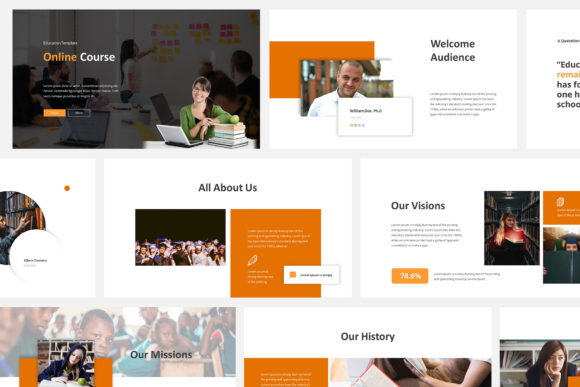
Think of your presentation slides as an extension of your brand identity. Just as your logo, website color palette, and social media graphics work together to create a cohesive image, your course materials must speak the same visual language. A premium template provides that unified framework from the start. With layouts based on master slides, you ensure that every title, body text box, and image placeholder maintains consistent spacing, alignment, and style. This pixel-perfect design eliminates the guesswork and tedious manual adjustments that often lead to visual inconsistencies across a 50-slide deck. The result is a seamless, professional look that builds trust with your audience, signaling that the course content itself is equally polished and reliable.
Practicality is baked into every element. The inclusion of object placeholders and resizable vector elements means you can drag and drop your own images, icons, and graphics without breaking the design flow. The overlay picture effect allows you to create sophisticated visual hierarchies, placing text over images in a way that remains perfectly readable. This isn't just about making things look pretty; it's about enhancing communication. When your visuals are clean and intuitive, your audience spends less time deciphering the slide and more time absorbing your valuable insights.
Beyond the Classroom: Versatile Applications for Your Template
While designed for course presentations, the utility of a well-crafted template like this extends far into other areas of your business. Its modern, adaptable aesthetic makes it a powerful design asset for various marketing assets and digital products.
- Sales and Pitch Decks: Use the same professional slides to pitch your course to affiliate partners, corporate clients, or conference organizers. The animated slides and sleek transitions create a dynamic narrative.
- Social Media Graphics: Export individual slides as high-resolution images for Instagram carousels, Facebook posts, or Pinterest pins that promote course modules or key takeaways.
- Webinar and Workshop Materials: The structure is perfect for interactive sessions, with clear layouts for agendas, speaker bios, Q&A prompts, and resource lists.
- Print Materials and Merchandise: The print-ready files and retina and Full HD quality ensure your designs look sharp on everything from workshop handouts and workbooks to branded merchandise.
- Internal Training and Reports: Repurpose the clean layouts for team training documents, project proposals, or quarterly reports, maintaining a consistent brand standard across all internal communications.
This versatility transforms a single download into a multi-purpose toolkit, saving you time and ensuring brand cohesion across every customer touchpoint.
Key Features That Streamline Your Workflow
The true value of a template is measured by how much time and frustration it saves you. The included features are specifically chosen to streamline the creation process, allowing you to focus on your content and delivery.
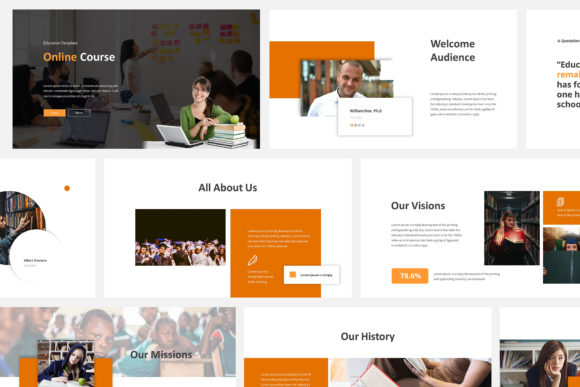
The package includes 30+ unique creative slides, offering a variety of layouts for introductions, module breakdowns, data visualization, testimonials, calls to action, and more. You receive files in both PPT and PPTX formats, ensuring compatibility across different versions of PowerPoint. The 16:9 widescreen size is the modern standard, filling screens without awkward black bars and providing ample space for impactful visuals.
Fully animated slides add a layer of professional polish without requiring you to become an animation expert. Subtle entrance effects, smooth transitions, and animated icons can guide your audience's attention and make the presentation more engaging. Furthermore, the use of free fonts means you won't face unexpected licensing costs or compatibility issues when sharing your final presentation. The video preview and documentation provide a quick start, while free fast support and free updates offer peace of mind for long-term use.
Practical Advice for Maximizing Your Template
To get the most out of this creative font and slide template, a strategic approach is beneficial.
Start with Your Content Outline: Before you open the file, map out your presentation's narrative arc. What are the core messages for each section? This will help you choose the most appropriate slide layouts from the 30+ options available.
Customize with Purpose: While the template offers an easy to use interface, resist the urge to change every color and font immediately. First, explore the master slides. Make global changes there to update fonts or primary colors across all slides at once, ensuring consistency. Use the icon set included to replace generic bullet points with visual cues that reinforce your points.
Test Your Visual Pairings: When inserting your own images, use the placeholder guides to ensure proper alignment and spacing. For text-heavy slides, ensure there is sufficient contrast between the text and any background images, utilizing the overlay effects provided for this exact purpose.
Think About the Viewer's Journey: Use the animated slides strategically. Animate a complex process step-by-step to aid understanding, but avoid excessive animation that can become distracting. The goal is to support comprehension, not to showcase technical flair.
Ultimately, this Online Course PowerPoint Presentation Template is a tool designed to remove barriers. It handles the heavy lifting of professional design—layout, animation, typography, and file preparation—so you can dedicate your energy to what truly matters: sharing your knowledge effectively and connecting with your audience. By presenting your ideas within a framework of modern, clean design, you elevate the perceived value of your course and create a more memorable and impactful learning experience.