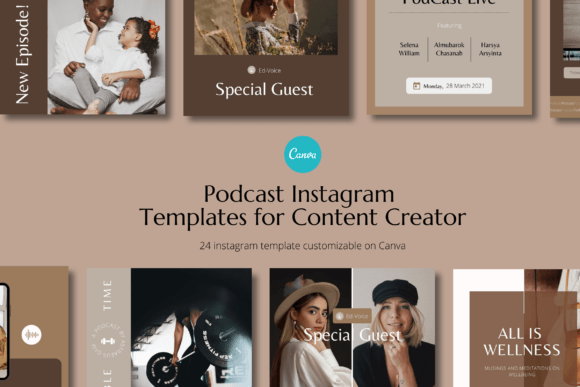
Streamline Your Podcast Promotion with These Canva Templates
Consistently promoting a podcast across social media feels like a second job. You spend hours recording and editing, only to face the blank canvas of Instagram. What image will grab attention? How do you create a cohesive look that listeners will instantly recognize in their feed? The constant demand for fresh, on-brand graphics can drain your creative energy before you even start on your next episode. This is where a thoughtfully designed template system becomes less of a luxury and more of a necessity for sustainable growth.
A Practical Toolkit for Busy Creators
The Podcast Canva Instagram Template pack is built on a simple premise: you should spend more time creating content and less time designing promotional materials. This collection provides 24 distinct, square-format templates (1080x1080 pixels) designed within Canva. The real value lies in its structure. It’s not just a random set of graphics; it’s a promotional kit designed for personal brands, coaches, and small businesses who need a professional, instant visual identity without the complexity.
What makes this approach effective is the focus on ease and customization. Every template is fully editable in Canva’s free version—no Pro subscription required. You can swap out photos, change fonts, alter shapes, and adjust color backgrounds with a few clicks. The text is completely editable, allowing you to tailor each message to your specific episode, guest, or call to action. This flexibility means the templates can evolve with your brand, not just serve a one-time purpose.
Building Visual Consistency Across Episodes
One of the biggest challenges in podcast marketing is creating a recognizable visual thread. When a potential listener scrolls through their Instagram feed, your posts should feel familiar, even before they read the text. A consistent use of color, layout, and typography is what builds that subconscious recognition. Using a predefined set of templates for your podcast ensures that every announcement, quote graphic, or episode teaser shares a common visual language.
This pack facilitates that consistency. By using the same base design system for all your promotional posts, you create a predictable yet engaging pattern for your audience. This visual rhythm helps build brand recall. Over time, your followers will learn to associate your specific color palette and graphic style with valuable content, making them more likely to stop scrolling and engage.
Adapting Templates for Diverse Marketing Needs
While the core purpose is podcast promotion, the utility of these templates extends much further. Think of them as a foundational design asset for your entire brand presence. Here’s how you can adapt them:
- Brand Announcements: Use a bold template to announce a new series, a live event, or a partnership.
- Content Repurposing: Transform a powerful quote from your latest episode into a standalone graphic that drives traffic back to the full show.
- Community Engagement: Create question-based templates or "this or that" posts to spark conversation in your comments.
- Product or Service Launch: If your podcast is tied to a business, use these graphics to tease a new offering, a webinar, or a limited-time promotion.
- Testimonial Highlights: Showcase positive listener reviews or guest feedback in a clean, professional format.
This versatility means you’re not just buying templates for one purpose; you’re investing in a flexible system for your overall social media graphics and brand identity needs.
Practical Tips for Maximizing Your Template Pack
To get the most out of a resource like this, a little strategy goes a long way. First, before you even open Canva, define your brand’s core colors and primary font pairing. Having these ready will make the customization process swift and ensure everything aligns perfectly with your existing materials.
Next, consider the hierarchy of information. Most templates are designed with a clear visual hierarchy—where the eye goes first, second, and third. When you edit, maintain this structure. If the template is designed to highlight a guest’s name, make sure that element remains prominent. If it’s for a key takeaway, ensure the text you add is concise and impactful.
Finally, think about your content calendar. Having 24 templates gives you a solid runway. Plan which template styles you’ll use for different types of posts throughout the month. This proactive approach eliminates last-minute design decisions and keeps your feed looking intentional and polished. Remember, the goal is to use the design assets to support your message, not to distract from it. The clean, modern typography and balanced layouts are there to enhance readability and professional presentation, letting your podcast’s unique voice take center stage.