Design Your Perfect Fall Campaign with This Editable Template
As the leaves begin to turn and the air gets that familiar crisp edge, it signals a busy season for everyone from local coffee shops to online boutiques. Autumn is not just a change in weather; it is a massive marketing opportunity centered around themes of harvest, warmth, and upcoming holidays. However, capturing that specific cozy aesthetic in a design file can be time-consuming. You often find yourself scrolling through stock photo sites or struggling to find the right color palette that screams "fall" without looking muddy. This is where having a high-quality, pre-designed file changes the game. Imagine having a professional layout ready to go, where the heavy lifting of composition and layer management is already done, leaving you to simply plug in your brand details and hit print.
The Anatomy of a Professional Autumn Design
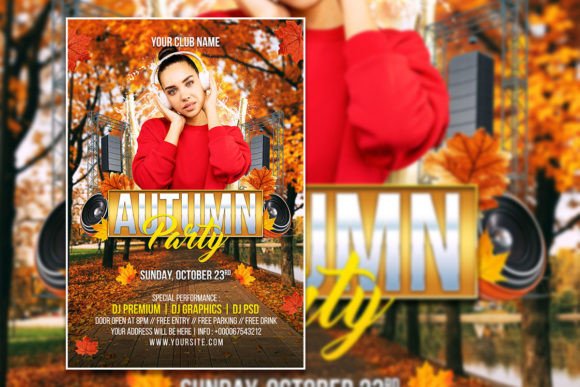
When you download a resource like the Autumn Flyer or Poster Template, you are getting more than just a picture file. This specific asset is built as a fully editable PSD file, which means it leverages the power of Adobe Photoshop to give you total control. The file comes in at 2000 x 3000 pixels with a 300 DPI resolution in RGB color mode. For those who are not deep into print specifications, this essentially means the image is high-definition enough for professional printing while still being optimized for digital screens. You won't have to worry about pixelation when you hang a poster in your shop window, nor will the colors look washed out if you post it to Instagram.
The visual appeal of a template like this lies in its organization. We have all opened a PSD file where layers are named "Layer 1," "Layer 2," and "Layer 3 copy," making it impossible to find the background. A professionally organized file uses clearly labeled folders and layers. This structure allows you to isolate specific elements—perhaps a cluster of autumn leaves or a specific text block—and move, resize, or delete them without destroying the rest of the design. It transforms the editing process from a frustrating puzzle into a smooth workflow, allowing you to focus on the creative aspects rather than technical troubleshooting.
Beyond the Bulletin Board: Versatile Applications
While the name suggests a "Flyer" or "Poster," the utility of a well-designed autumn layout extends far beyond paper tacked to a community board. Because the file is fully editable, you can repurpose the design assets to fit a variety of marketing channels. This is crucial for maintaining visual consistency across your brand identity. If you are running a promotion, you want your physical flyer to look like it belongs to the same family as your Instagram stories and website banner.
Here are a few practical ways you can adapt this template for different mediums:
- Social Media Graphics: By changing the canvas size in Photoshop, you can crop the design to fit an Instagram square (1080x1080) or a Facebook cover photo. The high resolution allows you to zoom in on specific details without losing quality.
- Website Banners: Use the background elements or the typography style to create a seasonal hero image for your homepage. This signals to visitors that your site is current and active.
- Digital Invitations: Hosting a fall festival, a Thanksgiving dinner, or a "Friendsgiving" sale? You can strip away the promotional text and replace it with event details to create a digital invite that looks custom-designed.
- Email Headers: Stand out in a crowded inbox by using a slice of the autumn design as your email newsletter header. It adds a professional polish that generic email builders often lack.
Customization: Making It Look Like You
The most significant advantage of an editable template is the ability to inject your own personality into it. The description notes that "all text can be edited," which is the baseline, but the real power comes from the ability to swap out imagery. Stock photos included in templates are placeholders. To truly connect with your audience, you should replace them with photos of your actual products, your team, or your physical location.
For example, if you are a baker, swap the stock image of a generic pumpkin for a close-up of your famous pumpkin spice latte or a fresh loaf of harvest bread. If you are a boutique owner, insert a photo of your new fall scarf collection. This simple swap bridges the gap between a "template" and a "custom brand asset." Furthermore, the instruction to simply select the text with the text tool means you can experiment with typography. If the provided font doesn't match your brand guidelines, you can easily highlight the text and type in your own brand name using your corporate typeface.
Design Tips for Autumn Aesthetics
When editing your Fully Editable Autumn flyer template, it helps to understand a bit about the seasonal aesthetic. Autumn design trends usually rely on earthy tones—think burnt orange, deep reds, mustard yellows, and rich browns. When you open the PSD file, take a look at the color adjustment layers. You might be able to tweak the hue and saturation to better match your specific brand palette. Perhaps your brand uses a darker, more "forest" green rather than a bright leaf green; these adjustments are easy to make in the layer styles.
Also, consider the hierarchy of information. A common mistake in flyer design is trying to say too much at once. Use the organized layers to hide elements that clutter the message. If you have a massive headline, a sub-headline, a date, a location, and a QR code, ensure they are balanced. The template provides the structure, but you provide the strategy. Ensure your call to action—whether it's "Shop Now" or "Join Us"—is legible and stands out against the background.
Streamlining Your Workflow
For small business owners and entrepreneurs, time is a non-renewable resource. Spending hours trying to build a flyer from scratch in Photoshop, aligning text boxes and searching for free stock photos, is often not the best use of that time. By starting with a professional base, you are effectively cutting your design time in half. You don't need to be a graphic design expert to produce a professional result; you just need to be able to follow the organized file structure.
Think of this template as a blueprint. It handles the "heavy lifting" of composition and resolution management, ensuring that the final product is print-ready. Whether you are creating a poster for a local farmers market, a social media post for an online sale, or a newsletter graphic, having this asset in your library ensures you are always ready to capture the spirit of the season the moment it arrives.