Craft a Mouth-Watering Twitter Post: The Delicious Pizza PSD Template
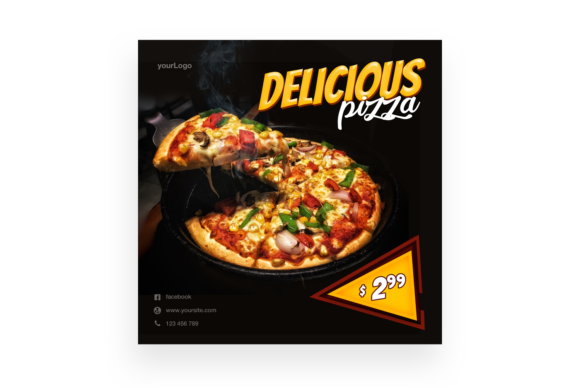
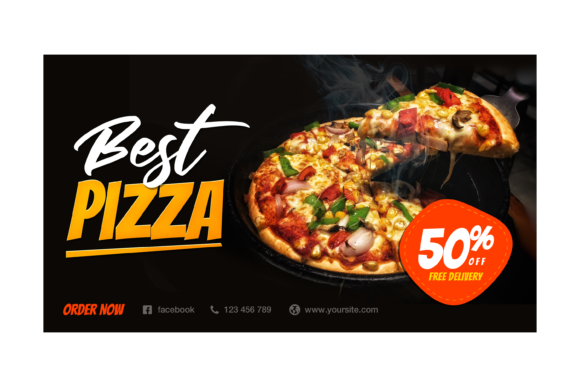
There’s a unique challenge in the food and beverage industry: conveying taste through a digital screen. When you are competing for attention on a fast-moving platform like Twitter (now X), a generic photo of a slice isn't going to cut it. You need high-octane visuals that stop the scroll. For graphic designers, social media managers, and pizzeria owners, creating these assets from scratch is time-consuming. This is where the Delicious Pizza Twitter Post template enters the conversation. It is not just a static image; it is a fully realized design asset built specifically for high-engagement food marketing, offering a professional edge without the need for a full-scale photoshoot.
Understanding the Technical Backbone of the Template
Before diving into the creative potential, it is important to understand what makes this specific asset viable for professional use. The template comes as a PSD file compatible with CS4 or higher, ensuring that even designers running older versions of Adobe Photoshop can utilize it without friction. The resolution is set at 2400×1350 pixels at 300dpi. This specification is crucial. While 72dpi is standard for web, 300dpi provides a density that allows for crisp edges and rich detail, which is particularly important when rendering the texture of melted cheese or the sheen of pepperoni.
The feature that sets this file apart from simple JPEGs is the inclusion of Smart Object Replacement. For the uninitiated, a Smart Object is a container in Photoshop that preserves an image's source content. In practical terms, this means you can double-click the layer, paste your own high-resolution image of a pizza, save, and watch it automatically warp, scale, and adjust to fit the pre-existing lighting and perspective of the template. This "Easy to Edit" architecture saves hours of masking and manual transforming. Furthermore, the "Organised Layers" promise means the file isn't a chaotic mess of unnamed layers; it is structured logically, allowing you to isolate shadows, highlights, text, and background elements independently.
Visual Appeal and Brand Identity
Visual consistency is the bedrock of brand recognition. When a potential customer sees your content on their feed, they should recognize your brand's aesthetic within seconds. The Delicious Pizza Twitter Post template provides a specific visual language—a curated, appetizing environment that signals quality. By utilizing this template, you are leveraging a pre-established composition that balances negative space with the subject matter. This ensures that your typography and logo have room to breathe, preventing the design from looking cluttered or amateurish.
Consider the psychology of color and composition in food marketing. This template likely utilizes a setup that enhances the warmth and saturation of the food item, making it look more appealing. For a small business owner or a digital marketer, this is a force multiplier. Instead of guessing at lighting angles or background textures, you are inserting your product into a proven scenario. This helps in building a professional presentation that elevates your brand identity, making your Twitter feed look curated rather than chaotic.
Practical Applications Beyond the Feed
While the name specifies a "Twitter Post," the utility of a high-resolution PSD with smart objects extends far beyond a single social media platform. The 2400x1350 aspect ratio is versatile enough for various marketing assets. Here is how different professionals can leverage this file:
- Social Media Managers: Beyond Twitter, this aspect ratio works well for Facebook cover photos or LinkedIn posts. The high resolution ensures it looks sharp on retina displays.
- Graphic Designers: Use the isolated elements for packaging design. The shadow effects or background textures can be extracted and used on pizza box mockups or menu designs.
- Bloggers and Content Creators: If you are writing a review on "The Best Late-Night Eats," this template serves as a perfect header image for your web design needs, ensuring the blog post looks professional and inviting.
- Print Materials: Because of the 300dpi setting, the resulting image is robust enough for print materials. Think flyers, table tents, or local newspaper ads.
- Digital Products: If you are selling a "Social Media Kit for Restaurants," incorporating this customizable asset adds value to your product offering.
The ability to manipulate the layers means you can change the background color to match a seasonal promotion—perhaps a deep red for Christmas or a pastel hue for a spring event—making the asset reusable throughout the year for different marketing assets.
The Typography Strategy: Matching Text to Visuals
A great image is only half the battle; the text overlay determines the call to action. The instructions for this asset mention a "Read Me.txt with link of the font." This is a vital detail for brand identity. When you open the PSD, you will likely see placeholder text. To maintain the design integrity, you should download and install the suggested font. Using the original typography ensures that the kerning (spacing between letters) and leading (spacing between lines) remain balanced as the designer intended.
However, customization is key. If the suggested font is a script font or a handwritten font, it might convey a casual, artisanal vibe. If your brand is more modern and corporate, you might want to swap it for a sans serif font. When choosing your replacement, consider the following:
- Readability: Twitter feeds are viewed on mobile devices. Avoid overly ornate display fonts for the main offer (e.g., "50% Off"). Save the fancy scripts for the header or logo placement.
- Contrast: If your pizza has a lot of yellow cheese, avoid yellow text. Use a dark charcoal or a crisp white to ensure the message pops.
- Font Pairing: If you use a bold serif font for the headline, pair it with a clean sans-serif for the details (time, location, website). This creates a hierarchy that guides the viewer's eye.
Commercial Licensing and Asset Management
One of the most overlooked aspects of using design assets is licensing. The prompt notes that the "Image is not included for preview purpose only." This is a standard licensing disclaimer. You are buying the design (the arrangement, the effects, the smart objects), not the stock photography used in the demo. This is actually a benefit; it means you aren't paying for a generic stock photo you don't need, and you avoid licensing issues associated with redistributing stock images.
However, you must ensure that the photo of the pizza you do insert is yours or properly licensed. Using a random image from Google Images to fill the Smart Object is a common mistake that can lead to copyright infringement. Always use your own photography or high-quality stock from reputable sites. Additionally, check the license of the recommended font. Some fonts are free for personal use but require a paid license for commercial use (like selling merchandise or using it in paid ads).
Streamlining Workflow for Entrepreneurs
For the entrepreneur or small business owner wearing ten hats, time is the most expensive resource. The "Delicious Pizza Twitter Post" template is essentially a workflow accelerator. By starting with a professional baseline, you bypass the "blank canvas paralysis." You don't have to decide on a layout, figure out drop shadows, or create a background from scratch. You simply swap the image, change the text, and export.
This efficiency allows for rapid A/B testing. You could create two versions of the post in minutes: one highlighting a "Lunch Special" and another focusing on "Family Size." By testing these variations on Twitter, you can gather data on which visual style drives more engagement, allowing you to make data-driven decisions about your brand identity and future creative direction.
Final Thoughts on Visual Communication
In the crowded digital marketplace, the quality of your visual assets speaks volumes about the quality of your product. A pixelated, poorly lit image of food suggests a low-quality dining experience. Conversely, a crisp, professionally composed graphic suggests a premium product. The Delicious Pizza Twitter Post template bridges the gap between professional design standards and the resources of a typical small business. It provides the tools necessary to create social media graphics that not only look appetizing but also drive business results through clarity, professionalism, and strategic visual composition.